
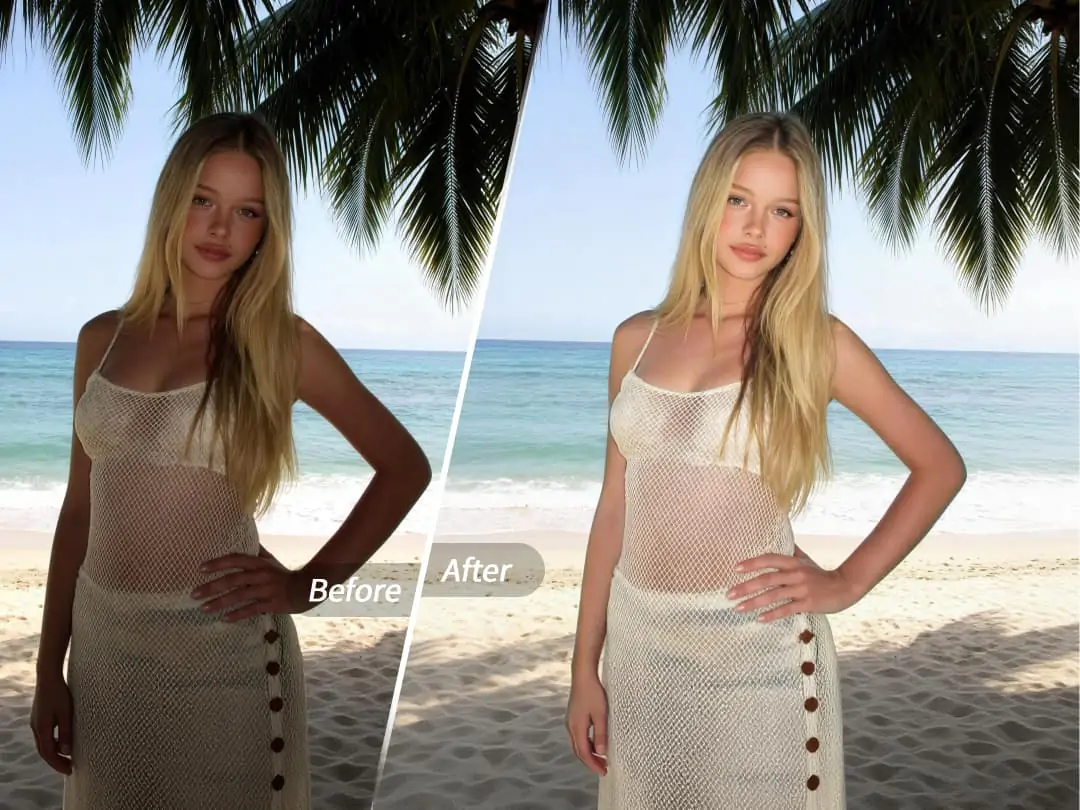
Have you also encountered this scenario? I happily took a bunch of photos with my friends. When I got home and looked through the photo album, I found that every photo was flat and lacked a sense of hierarchy. There is obviously enough light, but the face is not three-dimensional enough, and the eyes are not even bright enough. It is obvious that a filter has been used, but the atmosphere of the whole photo is still so bad. In fact, the problem is not your mobile phone lens, but the lack of a key link - light.


What is 3D lighting?
3D lighting is an intelligent light and shadow reshaping function launched by PrettyUp. By 3D modeling the face, it redefines the direction and intensity of light, giving the originally flat picture an instant sense of three-dimensionality and atmosphere.
"Key Highlights:"
- Auto mode, one-click reshaping of light and shadow: The system automatically recognizes the face structure and generates the best 3D lighting effect. No professional knowledge is required, and photos can have professional-grade three-dimensional light and shadow with one click.
- Manually adjust the face light and eye light: In manual mode, you can independently adjust the intensity and direction of the face light, and you can also add highlights to the eyes separately to make your eyes glow.
- Multiple presets, quick mood switching: Built-in global (global light), portrait (portrait light), tone (tonal light) and other preset styles, suitable for different scene needs, one-click switching can change the light and shadow temperament of the entire photo.
- Intensity slider control: Each mode is equipped with an intuitive slider, so you can easily control the lighting intensity and adjust it freely from soft natural light to dramatic stage effects.
- Dual support for pictures and videos: Whether it is still photos or dynamic videos, the 3D lighting function can be perfectly adapted to make every frame full of three-dimensionality.
Tip: If you are using it for the first time, it is recommended to try the automatic mode first to feel the effect, and then switch to the manual mode to fine-tune the face light and eye light, and gradually find the light and shadow scheme that is most suitable for the current picture.
What effects can 3D lighting bring?
The core value of 3D lighting is to put the control of the "light source" in your hands. Whether you are in a dark cafe, a backlit beach, or an interior with severe top lighting, it allows you to redefine the direction of light and shadow in your photos.
Reshape facial three-dimensionality:By 3D modeling the human face, 3D lighting can "supplement" the light source from any angle. Side light can highlight the contours of the face and make the lines of shoe bones and jawline clearer; top light can add drama; diffuse light can evenly and softly cover the entire face, making the skin look more transparent.
Light up your eyes and make your photos come alive:Eyes are the soul of people’s photos. The eye light adjustment in 3D lighting can add highlight reflection to the eye area alone, giving the originally dull eyes a vivid brilliance. Even photos taken in low-light environments will have a qualitative improvement in the mental state of the characters after eye light processing.
Switch the overall atmosphere with one click:Different lighting determines different moods in photos. Global (global light) is suitable for daily natural feeling, making the overall light and shadow even and natural; portrait (portrait light) highlights the main body of the character, suitable for half-length photos and close-ups; tone (tonal light) can bring about changes in the atmosphere of warm and cold tones, suitable for emotional portraits or creative shooting.
Applicable scenarios:
- Daily selfies and group photos: When the lighting is not ideal, add three-dimensional lighting effects with one click and say goodbye to flat faces.
- Portrait photography: Whether it is a studio shot or an outdoor shot, 3D lighting can make up for the lack of light on site.
- Indoor low-light environments: In low-light scenes such as cafes, restaurants, and bars, 3D lighting can make faces stand out from the background.
- Creative short videos: Add dynamic light and shadow effects to video materials to make the content more cinematic.
How to use 3D lighting?
Step 1: Select a photo or video
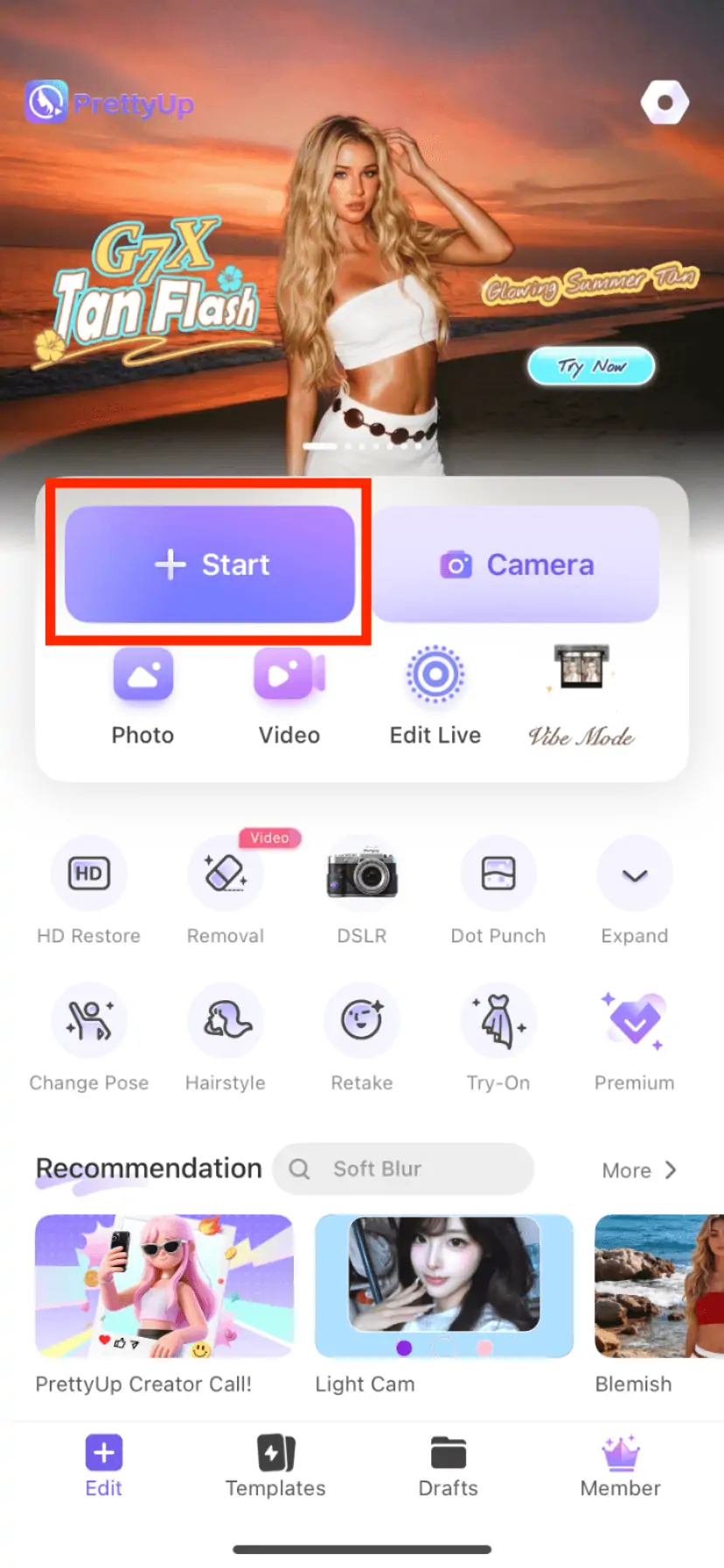
Open PrettyUp and select the photo or video that needs 3D lighting. If you already have an editing project, you can call this function directly in the editing interface.
Step 2: Enter the 3D lighting function
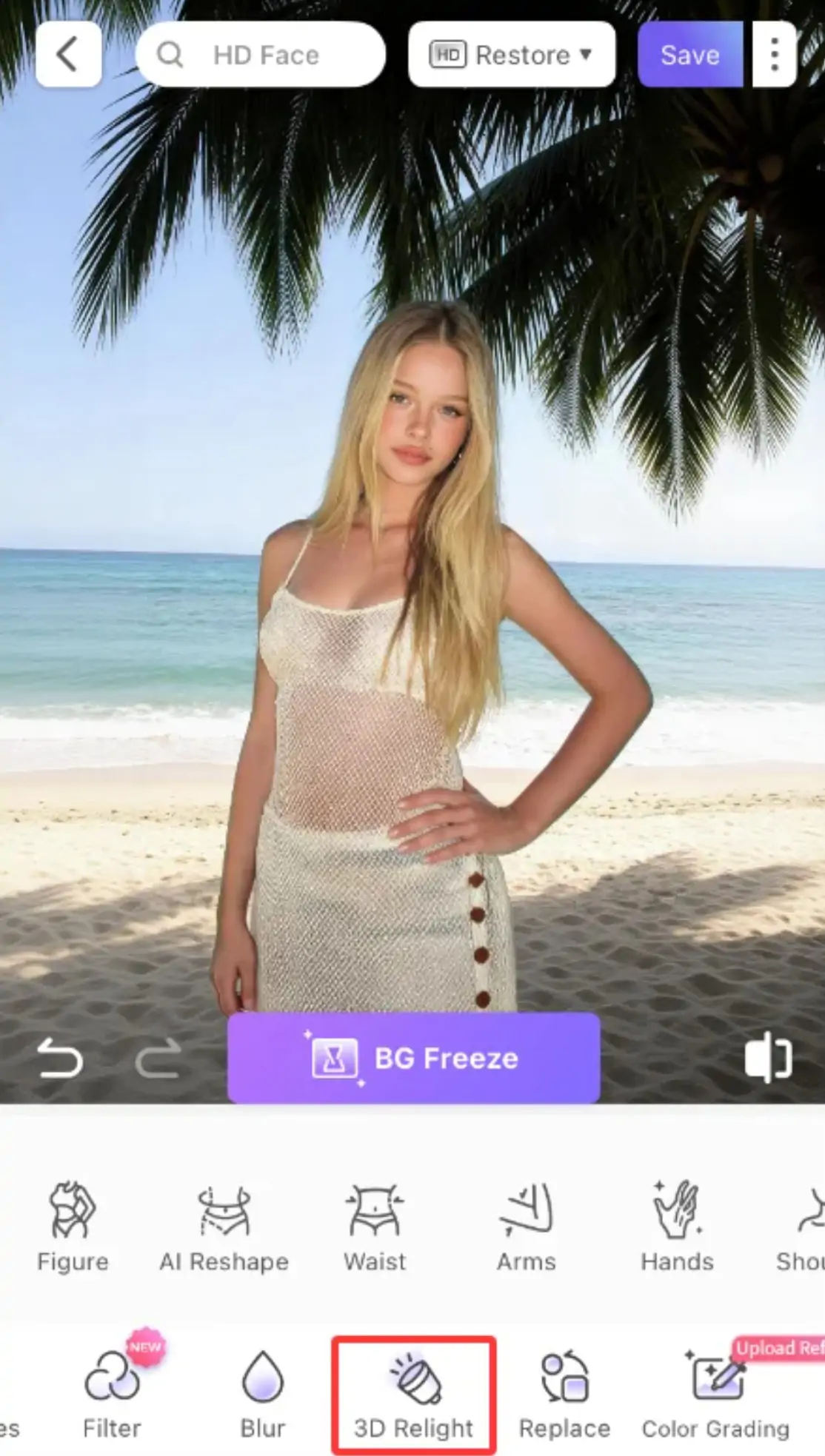
Find the "Face" module in the bottom toolbar, click to enter and find the "3D Lighting" option in the function list.
Step 3: Select lighting mode
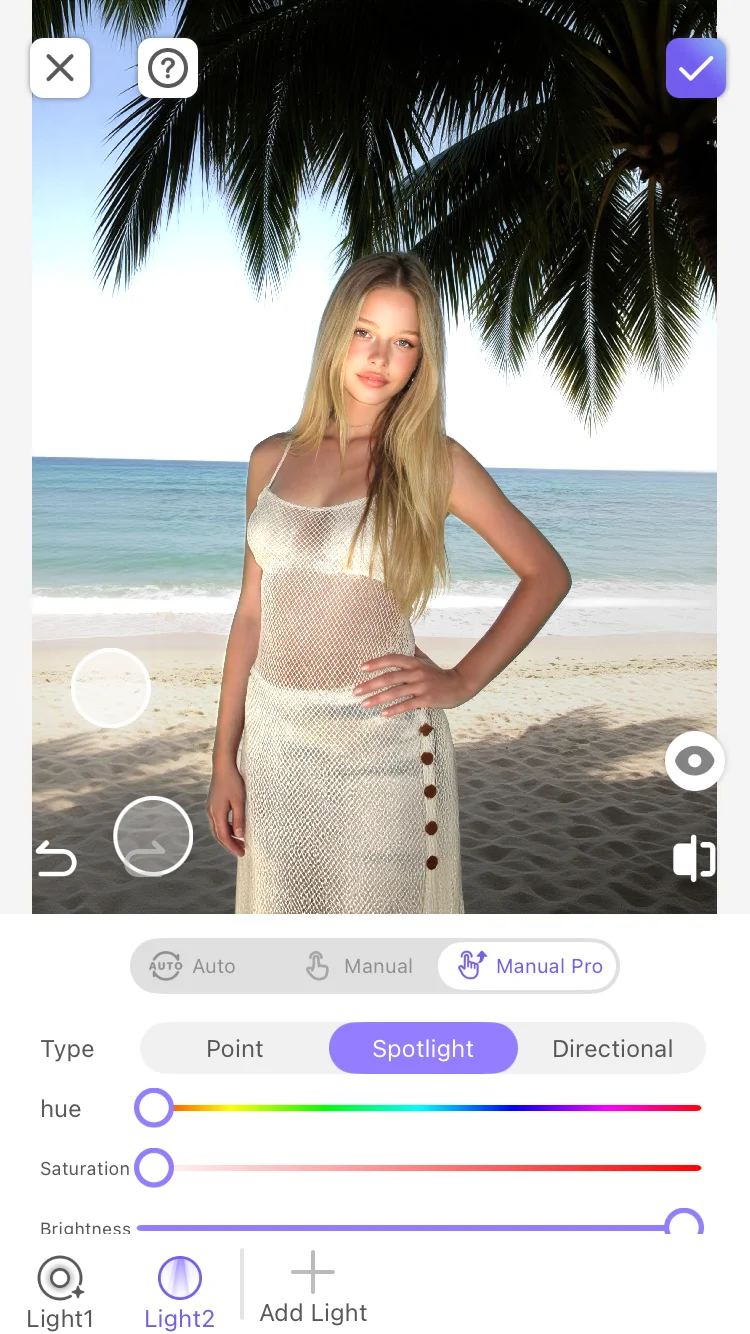
- Auto Mode: Click the "Auto" button, and the system will automatically analyze the structure of the face in the picture and generate the best light and shadow effects. You just need to use the intensity slider to adjust the overall intensity.
- Manual Mode: In manual mode, you can adjust the face light and eye light separately. Each item is equipped with an independent sliding lever, allowing you to finely control the direction and intensity of the light.
- Manual Pro Mode: If you pursue more extreme control, you can use Manual Pro Mode for more detailed light and shadow adjustments.
Step 4: Choose a preset style
In the preset list, you can try different styles such as global (global light), portrait (portrait light), tone (tonal light), etc. Each preset is a carefully adjusted light and shadow scheme. Click to preview the effect and quickly find the atmosphere that best suits the current picture.
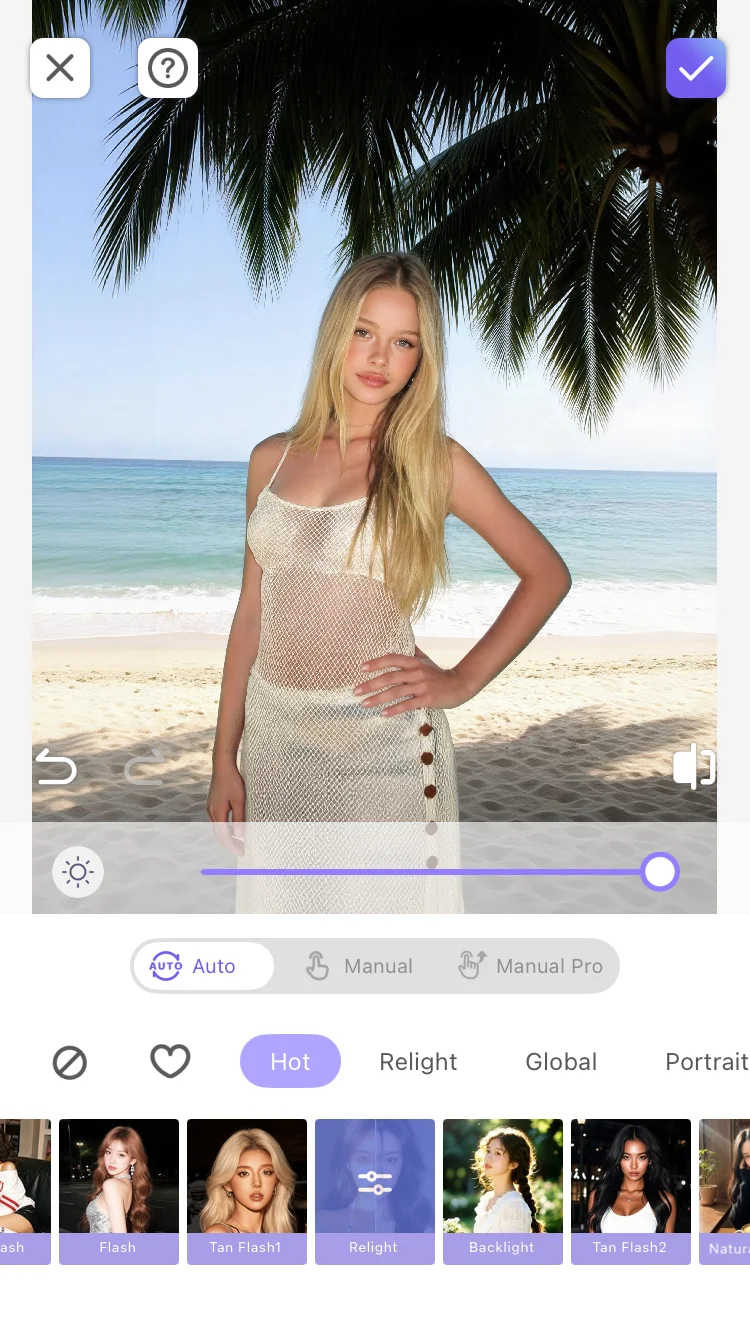
Step 5: Confirm and export
After the adjustment is completed, click "Confirm" or "Apply" to save the changes. You can continue to add other editing effects, or export the final product directly.
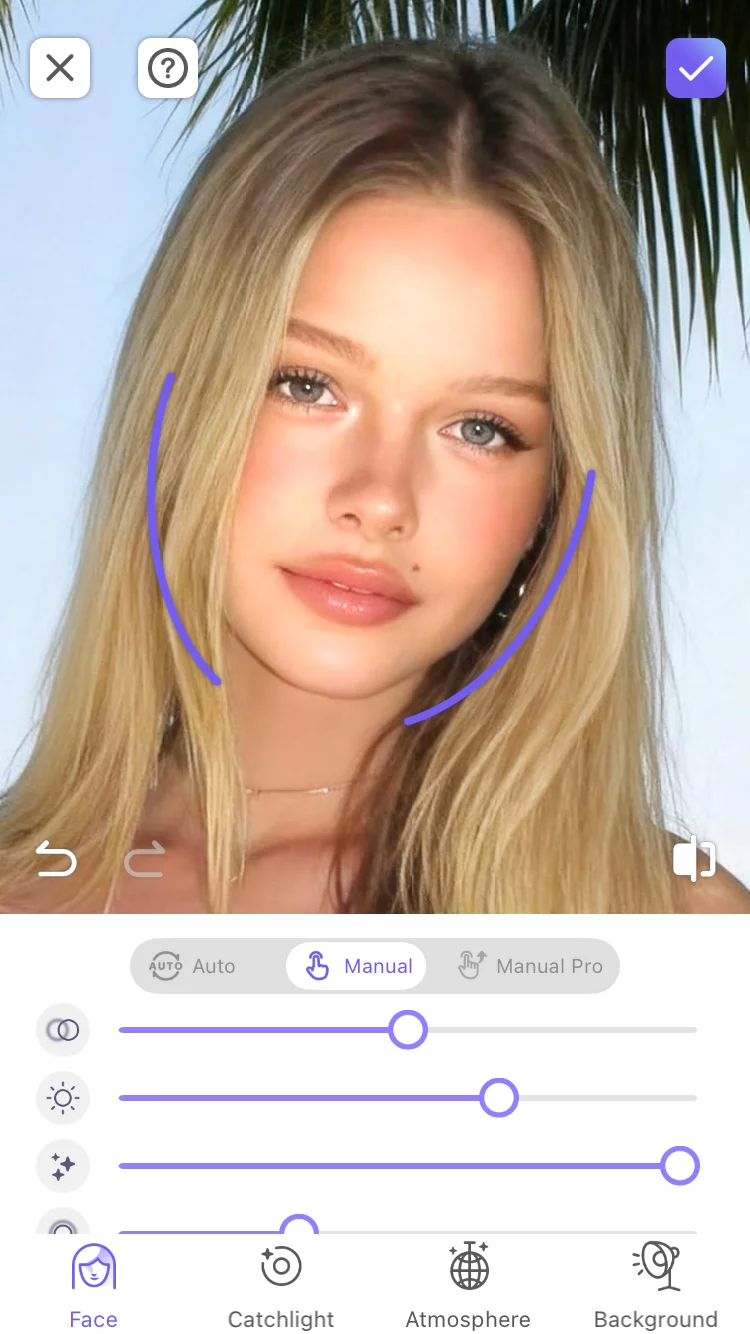
More usage suggestions
Tip 1: Start in automatic mode and then fine-tune manually. If you don’t have much experience with lighting, it is recommended to use the automatic mode to get a good basic effect, and then enter the manual mode to fine-tune the face light and eye light. This saves time and allows you to gradually understand the impact of different parameters on the picture.
Tip 2: Quickly switch styles with different presets. The same photo will show completely different emotions under different presets. It is recommended to use global or portrait when taking daily selfies. You can try tone when pursuing creative effects. Try a few presets and you may find unexpected surprises.
Tip 3: Pay attention to light source changes when using in videos. When processing videos, if the subject in the picture moves at a large angle, it is recommended to use automatic mode or choose a softer light and shadow preset to avoid the jumping feeling caused by the fixed direction of the light source.
Tip 4: Use in conjunction with other PrettyUp features. 3D lighting can be used in conjunction with the beauty function - first use the beauty function to optimize the skin condition, then use 3D lighting to supplement the three-dimensional lighting effect on the face, and finally use the color adjustment function to unify the overall atmosphere. You can create a movie-level portrait in three steps.
Summarize
3D lighting makes "light controllable" no longer a unique skill for professional photographers. Whether it is the convenient operation of automatic one-click, or the fine adjustment from hair to eyes in manual mode, PrettyUp provides you with lighting solutions that cover different needs. Next time you feel that your photo is "missing a bit of feeling", you might as well open PrettyUp and let 3D lighting inject soul into your picture.