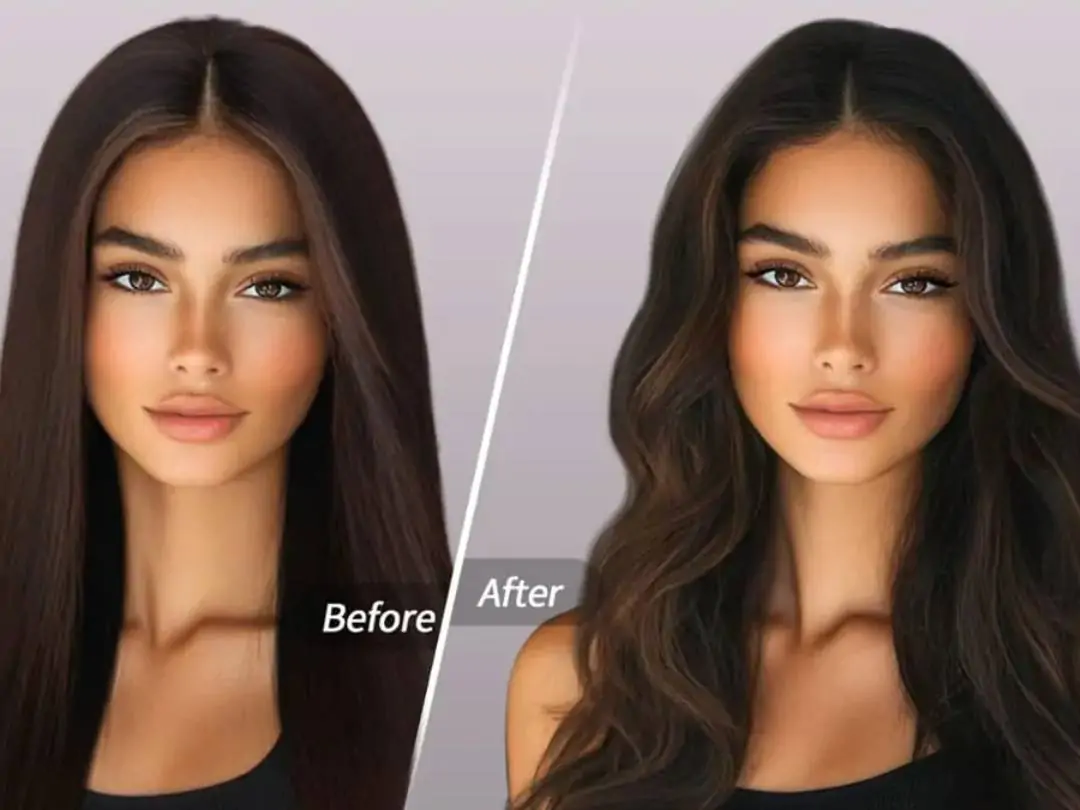
Do you have such thoughts? I want to change my hairstyle but don’t dare to go directly to the barber shop. I want to dye my hair a new color but I’m afraid of losing my hair. I want bangs but I’m not sure if they suit me. Going to the barber shop is a one-time investment, and if you are not satisfied, you will regret it for a long time. In fact, you don’t need to really change, what you need is a way of trying first and then seeing - try different hairstyles, hair colors and bangs on the photos, and then do it when you are satisfied.

What is AI hairstyle?
ai hair style is the AI smart hair style and hair color function launched by PrettyUp. It covers five categories: hair style changing, hair styling, bangs, hair dyeing and advanced hair dyeing, allowing you to try various styling effects with one click.
- Comprehensive coverage in five major categories: hairstyle changing, hair styling, bangs, hair dyeing and advanced hair dyeing, from hair style to hair color adjustment, one-stop to meet all hair style needs.
- Rich presets to choose from: One-sided braid, smooth straight hair, feather curls, water-gloss hair, retro bangs, soft matte black, caramel brown, mellow brown dyeing, rice gold dyeing and many other presets to meet different aesthetic preferences.
- Hair dyeing and advanced hair dyeing dual modes: Hair dyeing provides regular hair color presets, suitable for quick color changes; advanced hair dyeing supports complex hair dyeing effects (painting, gradient, etc.) and customized hair colors to create exclusive hair colors.
- Free adjustment of intensity slider: Each preset is equipped with an intensity slider, so you can easily control the degree of effect, from fine adjustments to obvious changes, and freely control the proportion.
- Pictures support all, and videos support hair dyeing: Pictures support all functions, and videos support ordinary hair dyeing effects, allowing you to change hair color in dynamic pictures.
Tip: Not sure where to start? It is recommended that you first try to change the hairstyle classification to see the effects of different hairstyles, then switch to hair dyeing or advanced hair dyeing to try hair color matching, and finally use bangs classification to complete the overall look.
What effects can AI hairstyle bring?
AI hairstyle provides five categories, and there are many presets for you to choose from under each category.
Change hairstyle:Change different hair styles with one click. Contains multiple presets such as single side braid, smooth straight hair, feather curls, etc. Single-sided braids are suitable for casual and sweet styles, smooth straight hair creates a natural hanging effect, and feather curls create light and fluffy curls. Each preset comes with an intensity slider to control how much your hairstyle changes.
hairdressing:Focus on optimizing hair texture. Contains presets such as dewy hair, wig repair, and high-ceiling hair extensions. Hydraulic hair can make hair look more shiny, wig repair can make photos wearing wigs look more natural, and high-ceiling hair growth can optimize the fluffiness of the top of the head, making the head look fuller and more beautiful.
Bangs:Try different bangs styles. Including retro bangs, straight bangs, eight-character bangs, French bangs and other options. Retro bangs are suitable for users who want a retro and elegant style. Straight bangs are classic for reducing age, splayed bangs modify the face shape, and French bangs are casual and natural. You can easily compare how different bangs look on your face.
dye hair:Quickly change your regular hair color. Contains presets such as soft matte black and caramel brown, which are suitable for users who want to quickly see different hair color effects. Both pictures and videos are supported, and hair color can also be changed in dynamic pictures.
Advanced hair dye:Supports more complex hair dyeing effects and customized hair colors. It includes gradient highlight effects such as mellow brown dyeing and beige gold dyeing, and you can also customize any hair color. The mellow brown hair dye creates a natural brown gradient, the beige hair dye presents fashionable golden highlights, and the custom hair color allows you to freely mix your own color.
Applicable scenarios:
- Hairstyle trial change: If you are not sure whether you want to change your hair style, try it first and then see.
- Hair dye test: If you want to dye your hair but are not sure whether the color suits you, try the color first and then decide.
- Bangs Trial Cut: I want bangs but I’m afraid they won’t suit me. I try a variety of bangs before choosing.
- Photoshoot: Match different hairstyles and hair colors for photoshoots to find the best look.
- Daily selfies: Quickly optimize hairstyle and hair color to make your photos more outstanding.
How to use ai hair style?
Step 1: Select a photo or video
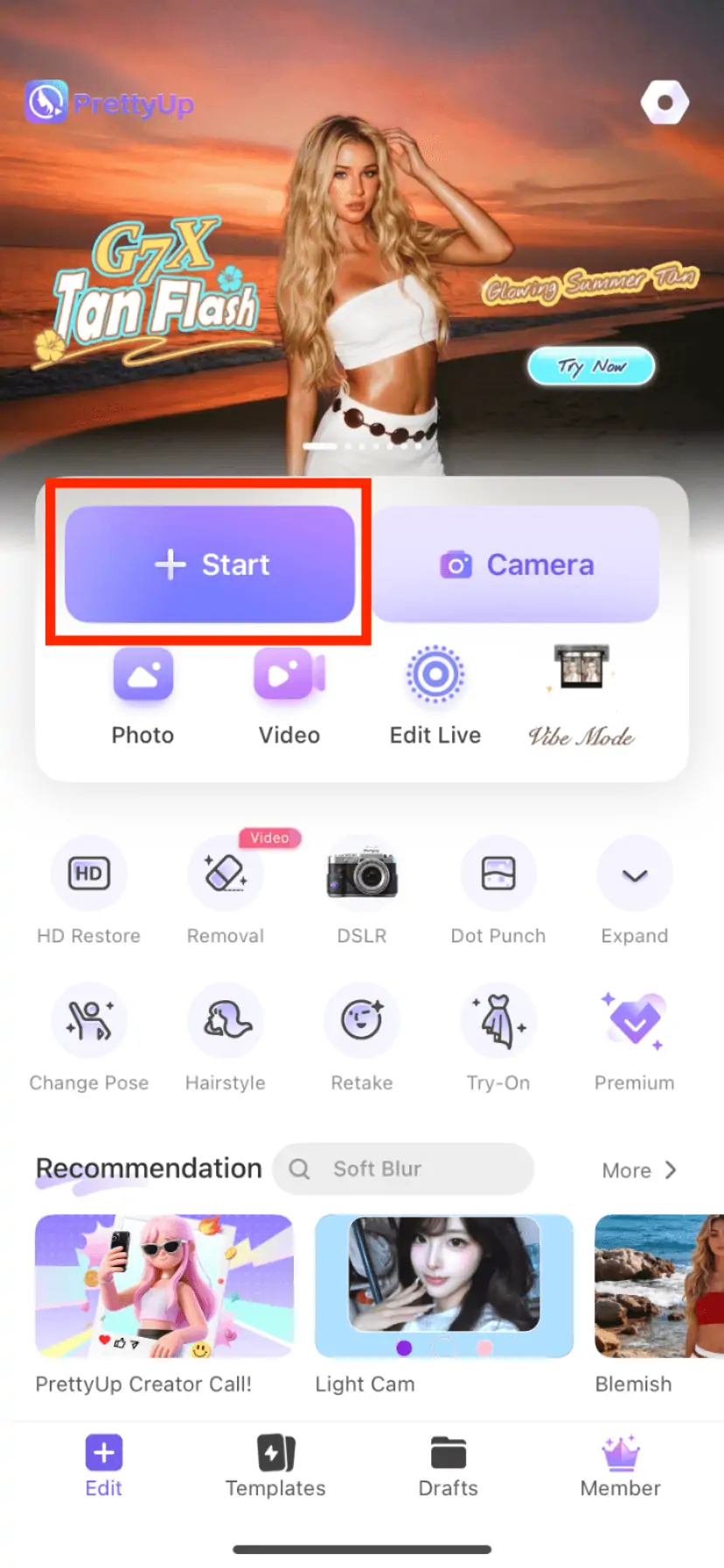
Open PrettyUp and select the photo or video you want to edit. The video only supports hair dye effects.
Step 2: Enter the ai hair style function
Find the relevant function entrance in the bottom toolbar, click to enter, find the "ai hairstyle" option and click on it.
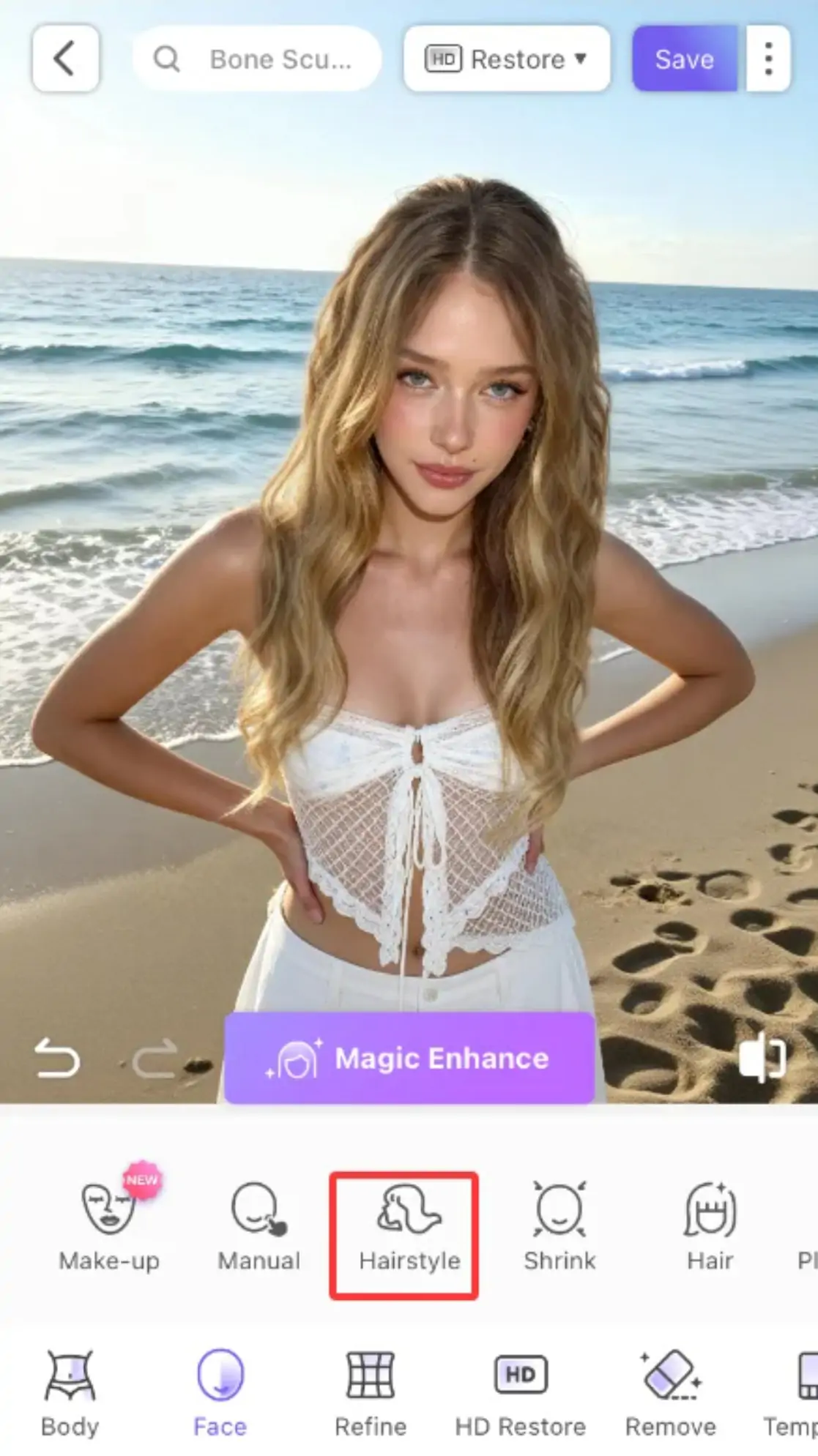
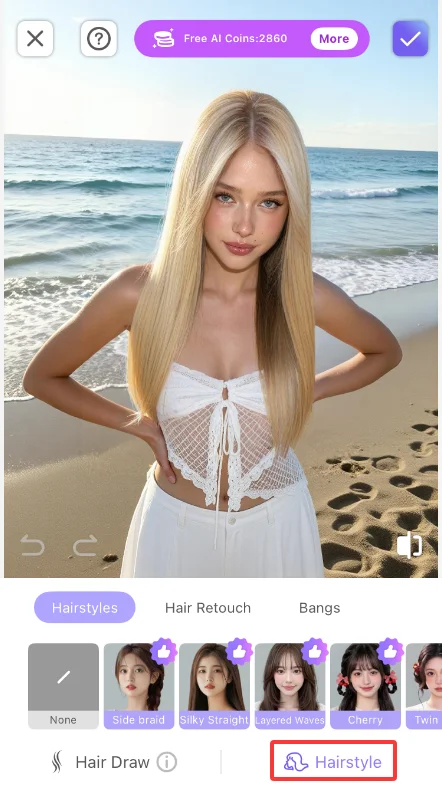
Step 3: Select a category
Choose what you need from five categories - hairstyle changes, hair styling, bangs, hair dye or advanced hair dye.
Step 4: Choose a preset style
Browse through the list of presets and choose your favorite style. The selected preset will become the reference direction of the effect, and you can switch to other presets for real-time comparison at any time.
Step 5: Adjust intensity
Use the intensity slider to control the degree of the effect. Move the slider to the left to lighten the effect, which is suitable for users who pursue fine-tuning; move the slider to the right to enhance the effect, which is suitable for scenes that require obvious changes. It is recommended to start from the middle value and gradually adjust to a satisfactory level.
Step 6: Confirm and export
When you are satisfied with the adjustments, click "Confirm" or "Apply" to save the changes, and then export your work.
More tips
Tip 1: Try the hair style first and then the hair color. It is recommended to use the "Change Hair Style" category to choose a hair style that suits you, and then switch to "Hair Dye" or "Advanced Hair Dye" to match your hair color. There are endless combinations of hairstyles and hair colors, so try several combinations to find the best effect.
Tip 2: Choose bangs according to your face shape. Different bangs suit different face shapes - straight bangs are suitable for long and heart-shaped faces, splayed bangs are suitable for round and square faces, and French bangs are suitable for most face shapes. AI hairstyle allows you to see the effects of different bangs on your face without actually cutting them.
Tip 3: Advanced hair dyeing to customize hair color. In the "Advanced Hair Coloring" category, you can customize any hair color. If the hair color you want is not available in the existing presets, use the customization function to mix your own color to create a unique hair color effect.
Tips 4: Use it with the AI hair function. AI Hairstyle can be used in conjunction with the "ai Hairstyle" function - first use AI Hairstyle to select the overall hairstyle style and hair color, and then use AI Hairstyle to finely adjust and supplement local hair to create a complete hairstyle plan from the whole to the details.
Summarize
AI hairstyle allows you to try out various hairstyles, bangs and hair colors without going to the barber shop. From changing hairstyles to changing hair styles, to improving the texture of your hair, to trying out hair colors, the five categories cover all your hair style needs.
Next time you want to change your hairstyle or dye your hair, don’t hesitate any longer. Open PrettyUp, try the AI hairstyle first, find the style that suits you best and then make a decision.