 WEB
WEB
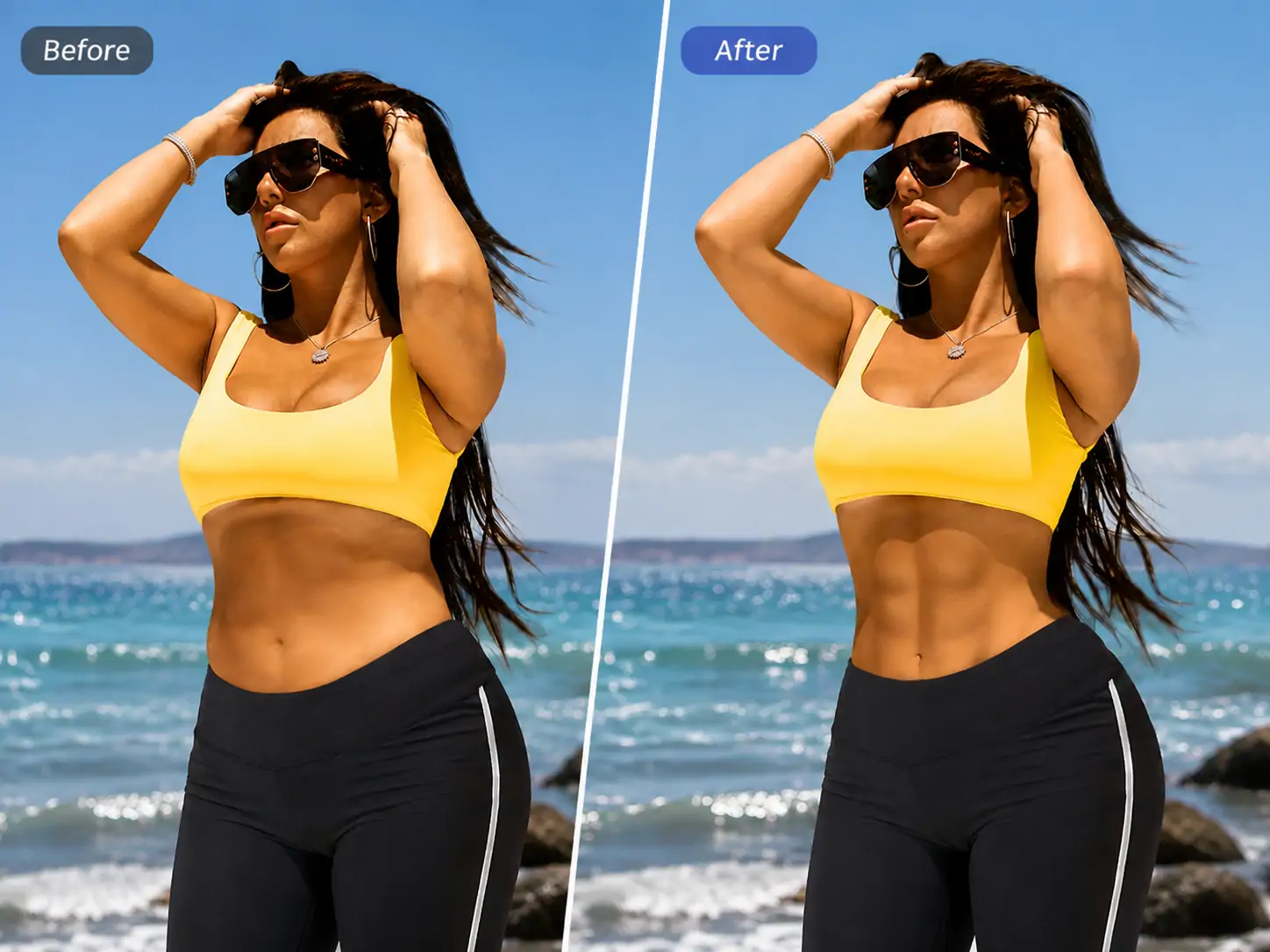
Have you ever thought about making your photos look more muscular? Men want to appear more solid and well-shaped, while women want to look firmer and more slender—but working out takes time, and photo editing is too complicated. Manual push-and-pull tools make it difficult to create a natural muscular look, and one wrong move can distort your body. In fact, you don't need to work hard at the gym or use complicated techniques; what you need is an AI muscle-enhancing solution that understands the differences between men and women.


What is muscle building?
Muscle building is an AI intelligent muscle shaping feature launched by PrettyUp, which differentiates muscle building effects for men and women, providing overall muscle building and various local presets, allowing you to achieve natural and attractive muscle lines with one click.
- Different effects for men and women: Intelligently adjust the degree of muscle growth according to physiological differences between men and women. For men, the effect is rougher and more pronounced, highlighting muscle mass; for women, the effect is softer and sleeker, shaping a firm and elongated body. After selecting the gender, the AI will automatically match the most natural muscle growth plan.
- Six major categories covering the whole body: Built-in categories include full body, abs, chest enhancement, waist slimming, hip enhancement, and collarbone. Each category has corresponding preset styles, allowing you to precisely target specific areas for muscle gain and body shaping.
- Multiple preset styles: Presets such as muscular, slim full-body, abs, rounded, waterdrop, hourglass waist, peach, etc., covering different aesthetic needs, allowing free switching to find the most suitable effect.
- Intensity Slider for Free Adjustment: Equipped with an intensity slider, you can easily control the level of muscle growth, from fine-tuning to noticeable enhancement, giving you full control over the effect.
- Images only: Currently focused on enhancing muscles in photos, making every picture show the best muscle definition.
Tip: For first-time users, it is recommended to select your gender first, then try the overall muscle gain effect to quickly see changes, and then switch to local presets to optimize specific areas.
Muscle-building function interface, displaying gender selection and preset list.
What effects can muscle gain bring?
The muscle-building effects differ between men and women, and it is further divided into six categories according to body parts, with preset styles corresponding to each category.
Differences in Effects Between Men and Women: For men, the muscle-building effects focus more on muscle mass and clear contours, making the physique look stronger and more powerful; for women, the muscle-building effects focus more on muscle firmness and smooth lines, making the physique look more slender and shapely. After selecting the gender, the AI will automatically adjust the focus and degree of muscle building to ensure the results naturally match your gender characteristics.
Whole Body (Body): Includes two presets: muscular and slim body. Muscular (Bulk) focuses on increasing muscle in the upper limbs and torso, making the shoulders wider and the chest thicker, creating a strong upper body silhouette; Slim body optimizes the overall physique while maintaining muscle lines, making the body look more toned and elongated.
Abs: Includes the preset for vest lines, focusing on optimizing the muscle lines along the midline of the abdomen to shape a clear abdominal contour.
Breast Enhancement (Enhance): Includes two presets: Round and Teardrop. Round shapes create a uniformly full bust, suitable for users seeking symmetrical aesthetics; Teardrop shapes create a naturally drooping, teardrop-shaped bust, moderately full at the top and fuller at the bottom, suitable for users seeking a natural effect.
Slim Waist (Waist): Includes the hourglass preset, while optimizing the waist and hip lines, shaping the curves of an hourglass figure.
Buttocks: Includes the Peachy preset, enhancing the fullness and firmness of the gluteal muscles, making the buttock lines rounder and lifted.
Clavicle (Clavicle): Optimize the contour of the clavicle area, making the clavicle more prominent and the shoulder and neck lines more graceful.
Applicable Scenarios:
- Workout Progress Photos: Compare before and after workouts to make muscle lines more defined and look better.
- Daily Outfit Photos: T-shirts, tank tops, sportswear, and other clothing, showing off better body lines.
- Swimsuits and Sports Photos: Photos in swimsuits, workout clothes, and other outfits that reveal more skin, making muscle lines appear more defined.
- Social media sharing: Platforms like Moments, Xiaohongshu, Instagram, etc., to show a better body shape.
How to Use Muscle Building?
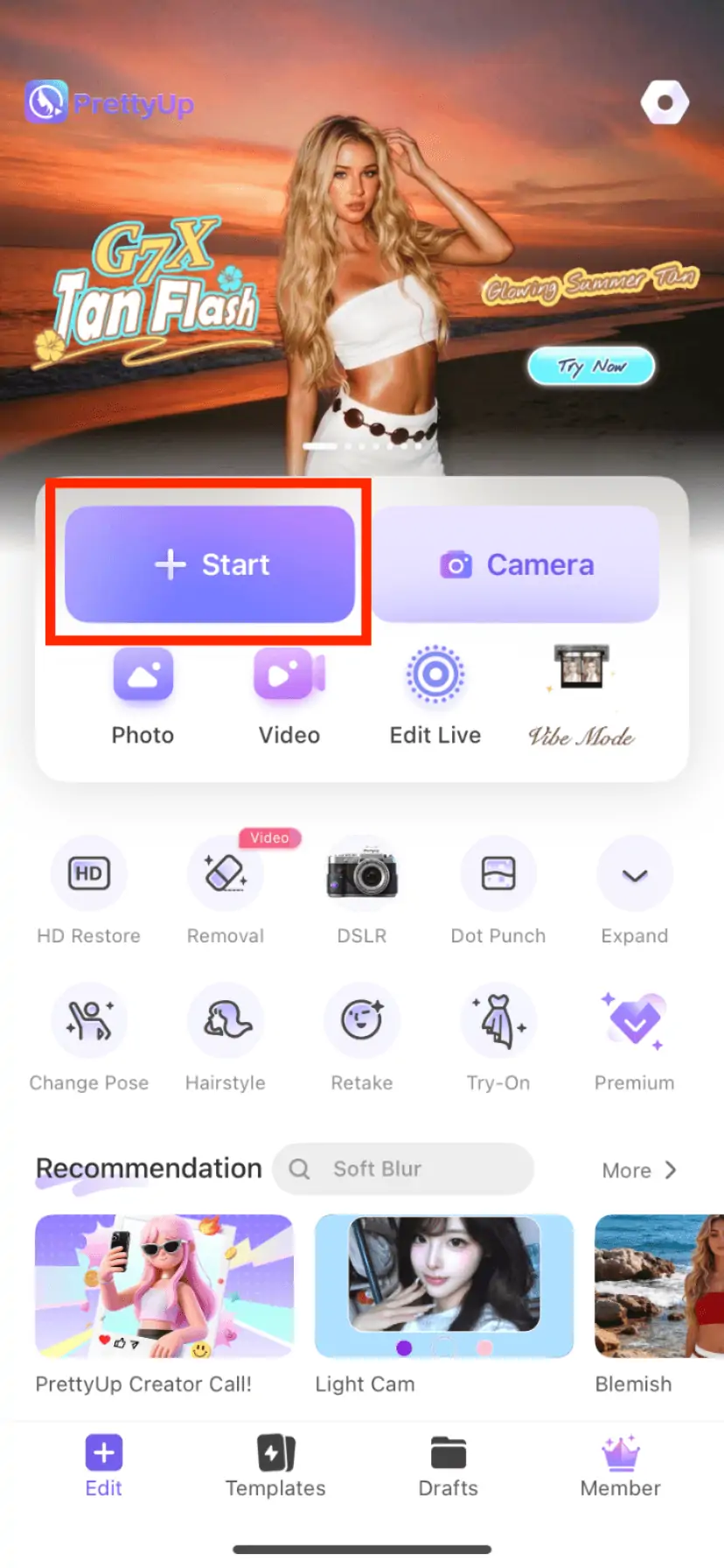
Step 1: Choose a Photo
Open PrettyUp and select the photo that needs muscle enhancement.
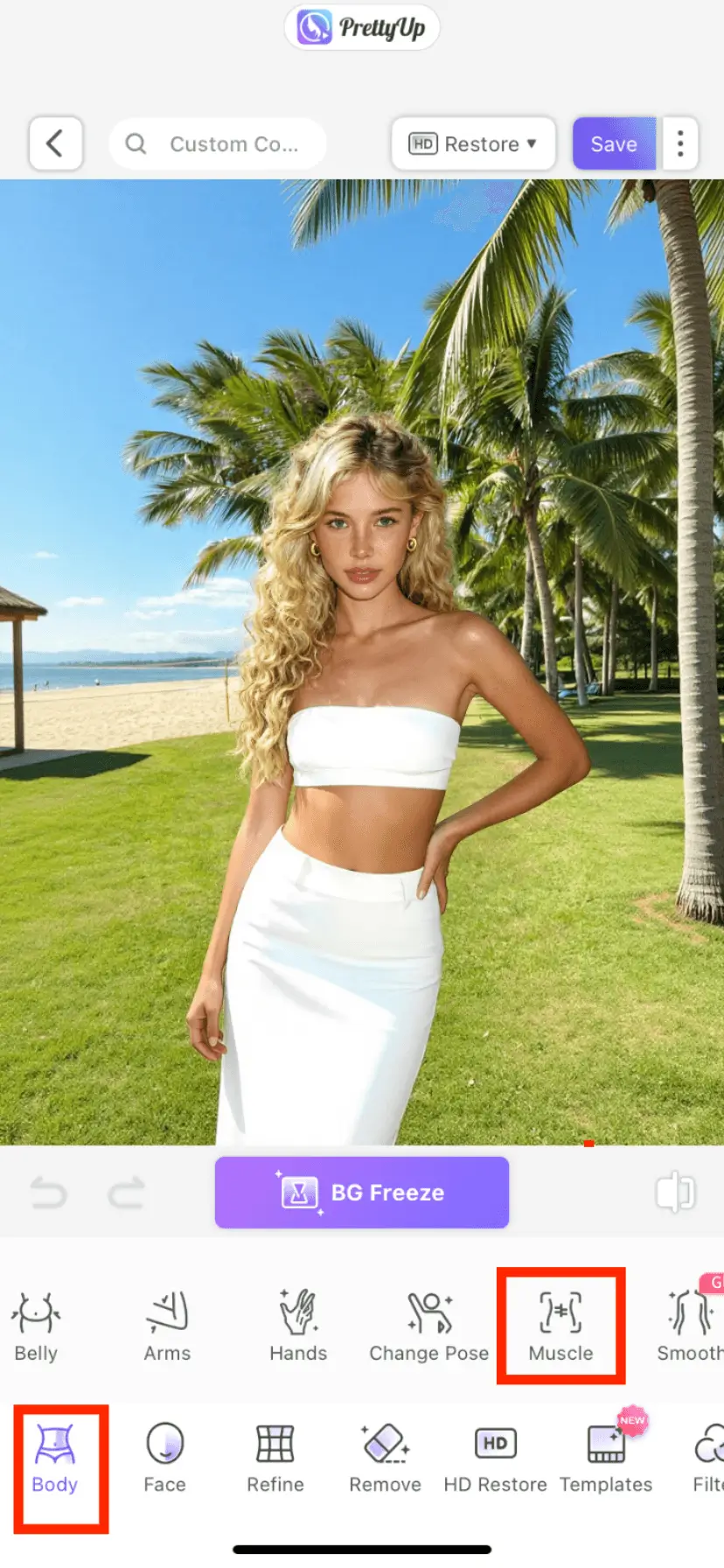
Step 2: Enter the Muscle Building Function
Find the 'Body' module in the bottom toolbar, click to enter, then find the 'Muscle Building' option and click it.
Step 3: Choose the Muscle Building Area
Choose the body part you need from the six major categories — whole body, abs, bust enhancement, waist slimming, hip enhancement, or collarbone. After entering a category, select a specific preset style, such as muscular, six-pack, plump, teardrop, hourglass waist, or peach.
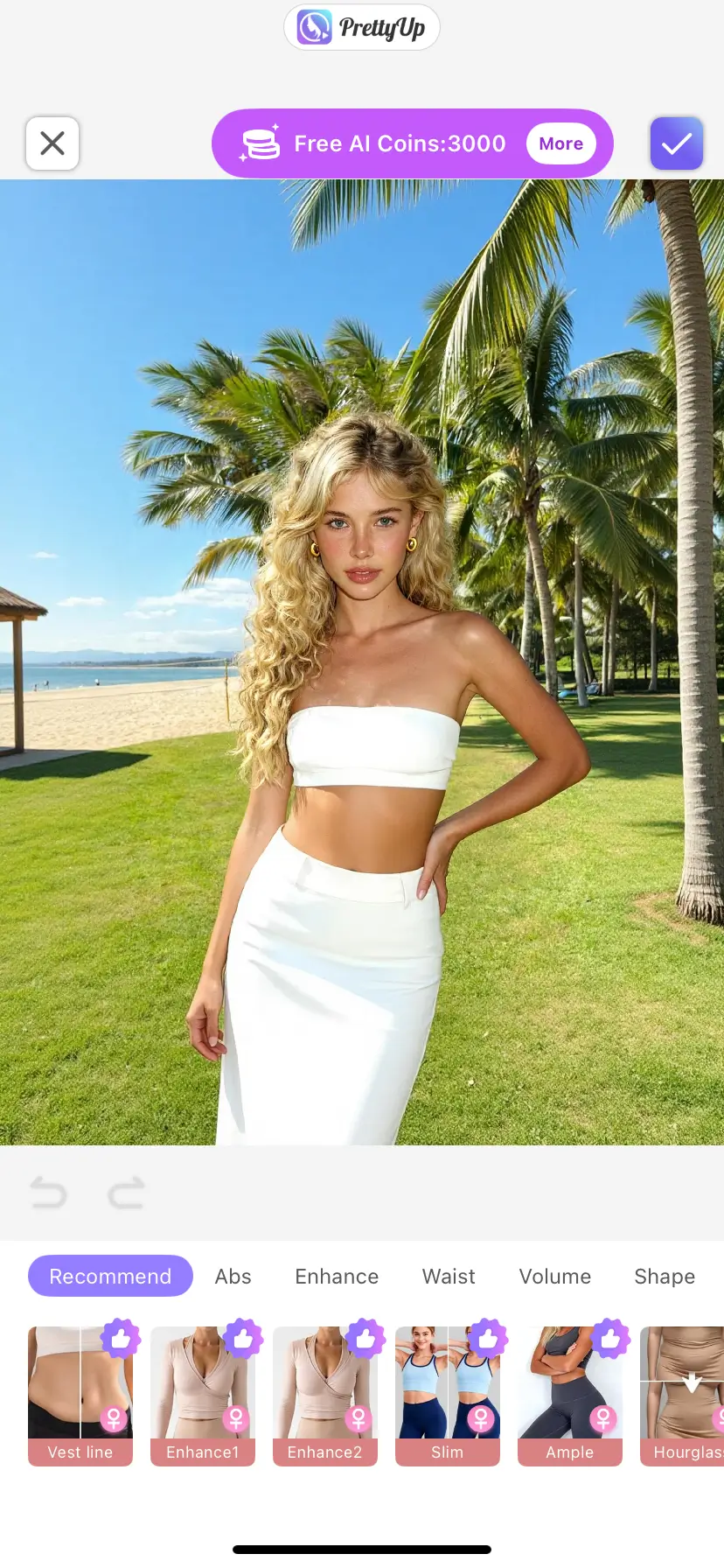
Step 4: Click Preset to Build Muscle with One Click
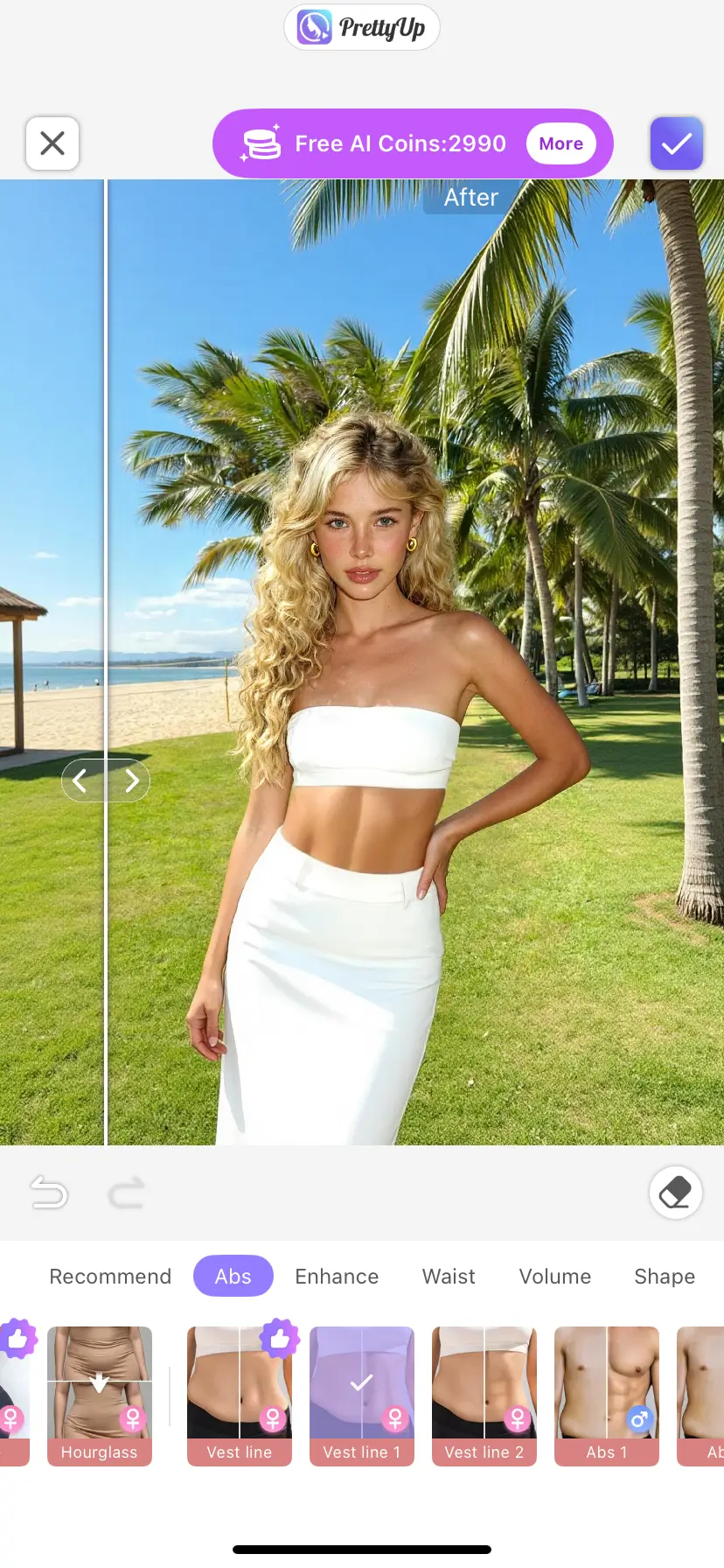
More Usage Tips
Tip 1: Choose the Effect Mode According to Gender. Be sure to select the correct gender before use; the AI will adjust the focus and degree of muscle gain based on gender. The effect for males is more suitable for users aiming for a solid, defined physique, while the effect for females is more suitable for users aiming for toned lines. If the effect you want differs from the gender preset, you can make fine adjustments using the intensity slider.
Tip 2: Combine Full-Body with Other Categories. It is recommended to first use the brawny or slim full-body presets under the 'Full-Body' category to achieve a basic effect, and then switch to other categories such as abs, bust enhancement, or waist slimming to strengthen specific areas. For example, first use the slim full-body preset to optimize the overall silhouette, then switch to the abs category and use the six-pack preset to make the abdomen more prominent.
Tip 3: Higher intensity is not always better. The goal of muscle building is to make muscle lines look more natural and attractive, rather than pursuing an exaggerated effect. It is recommended to start from a lower intensity and gradually fine-tune to find the balance that "looks like a natural fitness result." Excessively high intensity may lead to unnatural results.
Tip 4: Using Different Categories in Combination. The six major categories for muscle building can be used in combination to create a complete body-shaping plan. For example, first use the full-body category's Slim Full Body preset to optimize the overall lines, then use the Bust category's Rounded or Teardrop preset to enhance the chest, and finally use the Waist Slimming category's Hourglass Waist preset to highlight the waistline, coordinating multiple areas to shape the ideal figure.
Summary
Muscle building allows you to have natural muscle lines in photos without going to the gym. The intelligently designed differentiation between male and female effects, combined with six major categories and multiple preset flexible options, ensures that everyone can find the muscle-building plan that suits them best.
Next time you take photos, you won't have to delete them because you're not satisfied with your muscle definition. Open PrettyUp, increase your muscle with one click, and show a more sculpted body shape.